What an ATS actually rejects (and what it does not)
Applicant tracking systems are blamed for a lot of things they do not do. Here is what actually causes a resume to get filtered out.

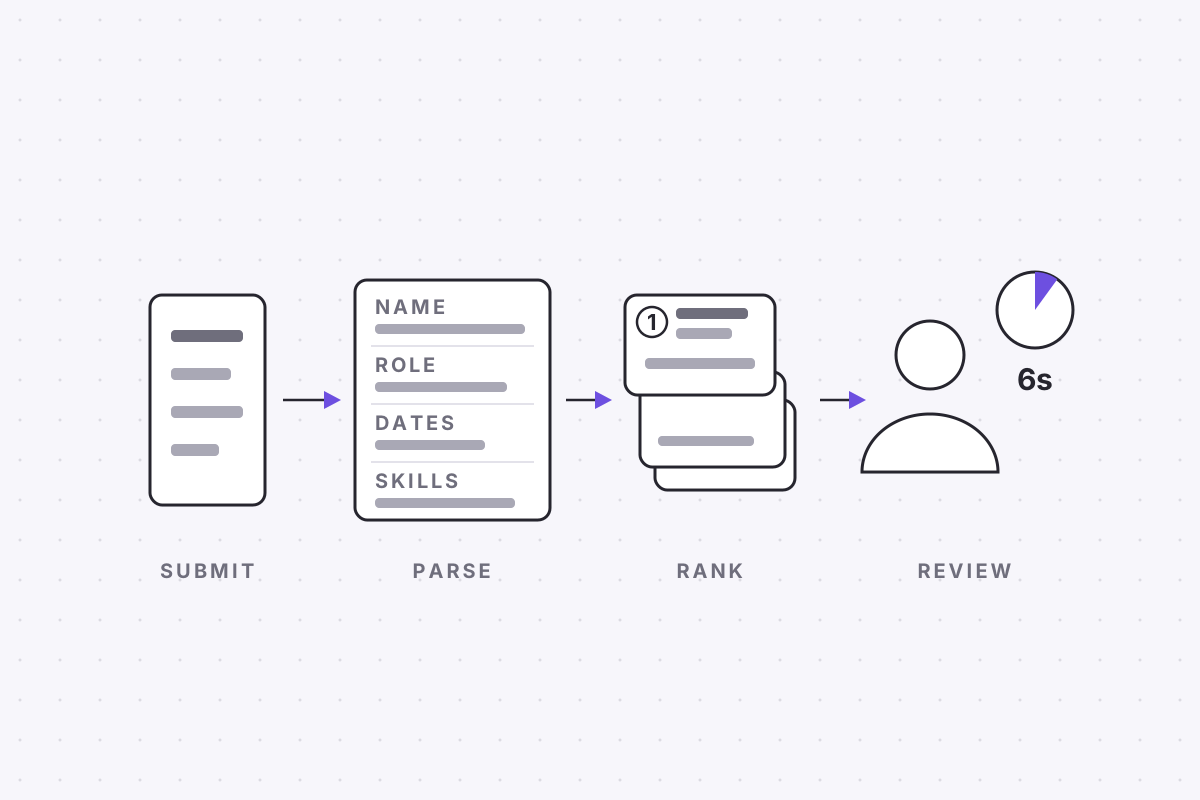
An applicant tracking system does not read your resume and form a view of it. Before anything else happens, a parser converts the document into a database record: name, contact details, employers, job titles, date ranges, qualifications, skills. Everything that follows, every search a recruiter runs and every filter they apply, operates on that record rather than on your file. Whether the software then rejects anyone by itself is a separate question, and the folklore around it is taken apart in no robot rejected your resume.
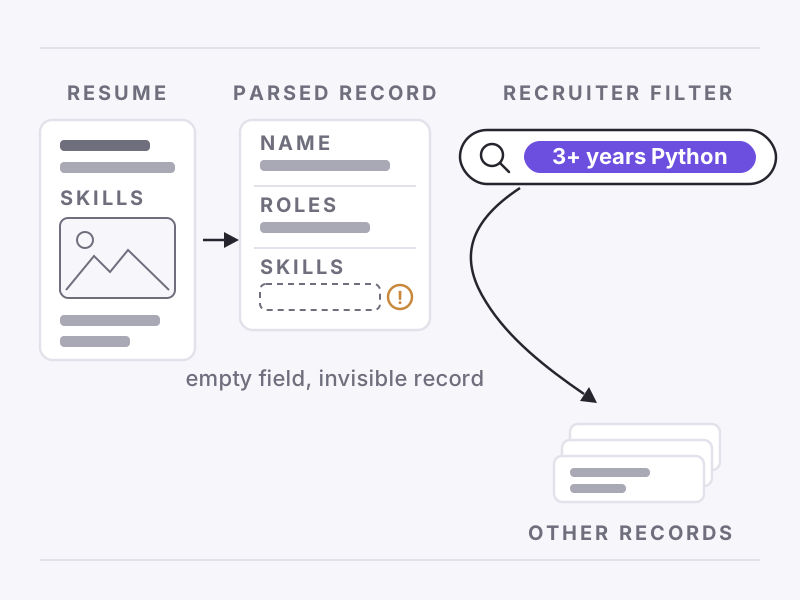
This post is about the conversion itself, because that is where applications actually get hurt. The failure mode is not a verdict but an empty field. A recruiter filtering on three or more years of Python never sees a rejection for you; they see nothing at all, because the field that should carry your nine years of Python carries nothing. Nobody decided to exclude you. The record simply never qualified for the query.
What a parser actually does with your file
Parsing runs in two steps, and knowing them explains almost every failure. First, extraction: the software pulls the raw text out of the document, in reading order, as one continuous stream. Second, segmentation: it cuts that stream into fields, deciding that this line is a job title, this pair of tokens is a date range, and this block belongs under Education.
The two steps fail differently. Extraction failures lose text outright, so a section that lived inside a graphic simply vanishes from the record. Segmentation failures keep every word but file it wrongly, so a job title lands in the skills field or a role reads as lasting zero months. The second kind is the nastier one, because the text all survived and the record is still wrong, which no amount of proofreading the original document would ever reveal.
What modern parsers handle well
The current generation is considerably better than the folklore assumes. A PDF with a real text layer parses cleanly and has done for years. Colour is fine, bold and italics are fine, ordinary bulleted lists are fine, and a sensible choice of font makes no difference at all. The commonly repeated advice to strip a resume back to a bare page of Times New Roman is a decade out of date.
Segmentation has improved too. Most mainstream systems now use trained statistical models rather than brittle keyword rules, which means they tolerate reasonable variation. A heading that says Work Experience rather than Experience is recognised without complaint, and dates in most common formats are read correctly. The improvement is real, but it has narrowed the failure surface rather than removed it, and what remains breaks in specific, predictable ways.
The constructions that still break
The same short list of constructions accounts for most of the parsing damage we see, and each fails for a mechanical reason rather than an aesthetic one.
- Multi-column layouts, because many extractors still read straight across the page, splicing a line of your skills sidebar into the middle of a job description and handing the segmenter a sentence that exists nowhere on your actual resume.
- Contact details placed in the document header or footer, which some parsers skip entirely, producing a record that parses perfectly and cannot be replied to.
- Text boxes and floating objects that hold real content, because a parser follows the main document flow and may never look inside anything floating beside it.
- Inconsistent date formats, where one role says 2021 to 2023 and the next says 03/2023 onwards, so the software misreads one of them and a tenure computes as zero months.
- Invented section headings, because segmentation maps headings to known fields, and a heading like Where I Have Worked maps to nothing, leaving everything beneath it unfiled.
Notice what is not on the list. A simple table of plain text usually survives a modern parser, though the extraction order of its cells depends on the tool that built it, so a table is a risk you take rather than a guaranteed loss. And invisible white-text keywords are not a parsing problem at all: the parser reads them perfectly, strips the formatting, and presents your trick to the recruiter as a block of visible gibberish.
A parser never tells you it failed. It files an incomplete record and lets the silence do the explaining.
The copy-paste test
You can see the extraction half of this yourself in under a minute. Open your resume, select all, copy, and paste into a plain text editor. What appears is close to what the extraction step produces, and each symptom points at a cause. Scrambled order means your columns are interleaving. Missing chunks lived in images or text boxes. A name that pastes as boxes and question marks is a font that did not embed as text, and an empty paste is an empty application.
The test has one blind spot: it shows extraction, not segmentation. Text can paste in perfect order and still be filed into the wrong fields, with dates unread and titles attached to the wrong employer. ApplyHustle's free ATS check covers that half, running your file through the same class of parser an employer uses and showing you the resulting record field by field, which turns the guesswork into a checklist.
What to change today
Every fix here is formatting work, not a rewrite, and one sitting covers the lot. Move to a single column. Put your name, email and phone number in the body of the first page rather than the header. Use the section headings a parser expects: Experience, Education, Skills. Take any fact that matters, a title, a qualification, a tool, out of graphics and into plain text.
Then standardise your dates, because they feed the filters recruiters actually run. Pick one format, month and year, and apply it to every role without exception. Tenure and total experience are computed from those pairs, and a misread date does not produce an error message; it produces a candidate with three years of experience where there should be seven, quietly failing every filter set above the misread number.
None of this caps how good the document can look. Typography carries hierarchy through a parser untouched, and layout tricks do not, which settles the trade. Once the record parses cleanly, both of your readers, the machine that retrieves and the person who decides, are finally judging the same thing: the words.